KEY FUNCTIONS
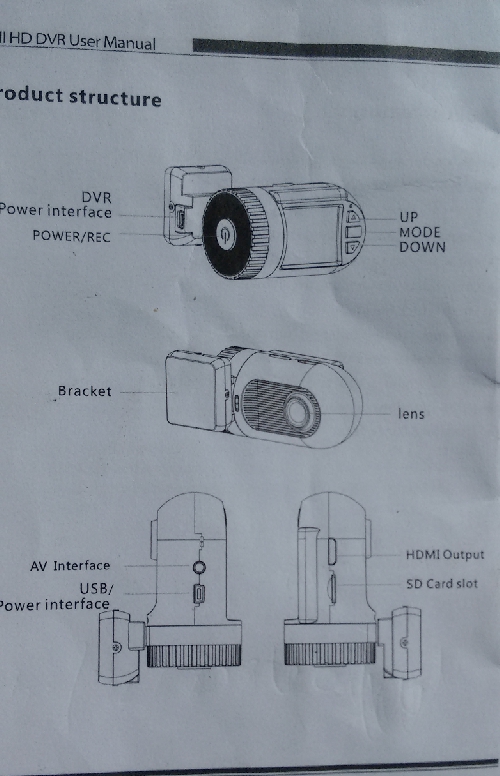
POWER / REC BUTTON
1.On/Off key :To power on press once,to
turn off press and hold for 5 seconds.
2.Recording function : When in Video
mode long press 2 seconds to record,to
finish press for 2 seconds.
3.Snapshot function : When in Snapshot
mode press to take picture.
4.Menu Setup function : In menu mode
press 2s for setting mode.Select option
press 2s to confirm, press 2s to exit.
MODE KEY
In standby press to set the mode Video,
Photo or playback.
The menu key function press 2s for menu
then 2s for menu contents, the order is
Video, photo, menu, gps settings and exit.
EMG video manual lock key: in cycle record
state press to lock video file against
deletion,( except SD card formatting ).
The sound record quick key: in record state
2 second press to open / close sound.
UP :Use to scroll menu & video files.
DOWN :Use to scroll menu & video files.
The countdown record quick key: In video state press this key and 2 second REC key
for auto record after 5 seconds.
.USB / POWER :Computer / charger connection.
HDMI & AV for tv / other connection.
OPERATION GUIDE
RECORD MODE: menu functions.
1.RECORDING SETTING
1.1 Resolution video options: 1920*1080P*30fps or 1280*720P*30fps.
1.2 Reord video quality options : super nice, nice, ordinary?
1.3 Cycle recording options: Off 1 / 2 / 3 / 4 / 5 minutes.
1.4 Video delay options : Off 15 seconds / 30 seconds / 1 / 5 / 10 minutes.
1.5 Recording function : switch options closed / open.
1.6 Motion detection : options open / closed.
1.7 G sensor sensitivity options : closed / 1 / 2 / 3 / 4 / 5.
2.VIDEO PARAMETERS SETTING.
2.1 Light optical frequency options : auto / 50hz / 60 hz.
2.2 Auto exposure options : mode1 / sport / view / auto / night / portrait / sunset /
desert / snow / skin / spot / water.
2.3 White balance options : auto / incandescent lamp / D4000 / thed5000? / sunny /
cloudy / flash / water / preset.
2.4 Color options : closed / art / tan / negative / black & white / bright.
2.5 Contrast options : standard / sharp / soft.
2.6 Sharpness options : standard / sharp / soft.
2.7 Metering mode options : center / average / fixed.
2.8 Iso options : auto / 100 / 200 / 400.
2.9 Exposure compensation options : - / - 2.0 EV to 1.7 EV / 1.3 EV / 1.0 EV / 0.7 EV /
0.0 EV / EV / + 1.0 / + 0.7 / + 0.3 EV EV / EV + 2.0 / + 1.7 / + 1.3 EV EV.
2.10 Close night exposure compensation on / off ?
3. THE MAIN SETTING.
3.1 Language options : English / Simple Chinese / Russian / Traditional Chinese.
3.2 Time & Date : use up/down to select and press REC to set. The setting is a single
direction mobile changes but can be recycled, press mode key to setup, long 2 second
press to exit.
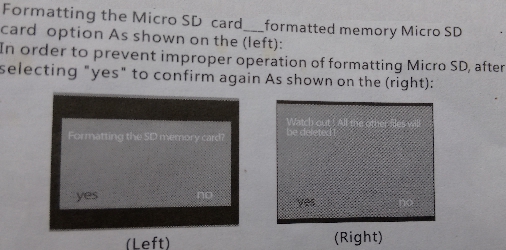
3.3 Formatting SD card shows two screens Format & confirmation option is yes / no
whichever is highlighted in white font.
3.4 Factory Default setting : will restore camera to Factory State after restart.
3.5 LCD settings options : brightness / contrast / color balance
press up/down to select each of parameters settings ( The setting is in a single
direction but can be recycled ) use REC button to set.
3.6 Time stamp options : closed / date / time & date.
3.7 Volume options : 0 mute / 1 / 2 / 3 / 4 / 5 / 6 / 7 loudest.
3.8 Automatic shutdown options : disable / after 1 min / after 3 min / after 5 min.
3.9 Automatic close display ( shuts off screen ) options : disable / after 1 min /
after 3 min / after 5 min.
3.10 Software version number.
4. GPS SETTINGS
4.1 Time zone options : -12 to 0 to +12 hrs
4.2 GPS options : open / close, when open two further options are offered :-
a. GPS location on / off.
b. GPS speed on / off.
THE SETTINGS MENU OPERATION
Long press MODE key 2 seconds (menu) can enter the settings, then long press
MODE key (menu) 2 seconds to switch (video settings / video parameters Settings
menu / machine settings).
PHOTO MODE
In photo mode long press mode key 2 seconds to enter photograph menu.
The photograph settings :
1. Picture quality options : very nice / kind / common / automatic ?
2. Picture size options : 1 M / 2 M / 3 M / 4 M.
3. Photo set options : capture / capture 2 / capture 3.
4. Automatic exposure - continuous exposure mode options : closed / three / five.
Photographic parameters settings :
( with the video parameters settings operation )
Menu Settings
( with the video parameters settings operation )
PLAYBACK MODE
Playback operation
press mode key to enter the playback mode, use up / down to select file, long press
2 seconds REC button to enter full screen can play video files or full screen view
photos, long press 2 seconds play video files.
In the process of playing file up key to fast forward, press down button can slow
motion play, continuous press the up & down keys can choose different fast
forward & fast reverse, return to normal play long press REC button 2 seconds,
press mode key to exit full screen.
USB CONNECTING
USB enables automatic USB mode, TF card available for file transfer of videos &
photos, card can also be formatted.
Note:
Make sure card is the correct way round when inserting, the camera can be
damaged otherwise.
Pictures and videos can be saved to HHD.
Do not attempt to repair camera unless you know what your doing.
Inappropriate use can cause fire, electric shock or other damage.
BATTERY
When not being charged it maintains clock & memory functions.
Under normal circimstances battery video length is about 20 minutes, if the low
battery symbol appears connect to power source to recharge.
FUNCTIONS AND FEATURES
1. In order to reduce power consumption there is an automatic shutdown function
in the menu settings automatic GuanBing ?? function.
2. To prevent card full error videos cannot be sequenced when full the exsisting
video will be overwritten. If you want to preserve a video press the mode key
whilst it is playing / recording this should remove it from the cyclic mode i.e. save
that section of card. It can then only be removed by formatting.
3. If the camera suddenly loses power or is in video delay function it will auto
shutdown.
4. HD port for TV video.
5. To faciliate in-driving video recording on the fly, a switch shortcut is 2 second
press mode key (menu) open the recording function (switch on in other words)
to stop recording 2 second press of the mode key.
6. This machine has high definition video 30 fps, a maximum resolution of 1920*
1080*30fps.
PRODUCT PARAMETERS
Sensor 2 Million pixel COMS lens ( OV2710 )
Camera Angle 120° level
Compressed format H 264
Video Resolution 1920*1080*30fps or 1280*720*30fps
Record format MP4
Screen 1½ inch high-definition LCD screen
GPS Optional
Video output HDMI or AV output
Memory card Micro SD card maximum support 32 GB
Size 75 x 40 x 40 mm
Ports USB 2.0
Battery 3.7V 320 mah
Working Temp/Humidity -20° — 80° / 0% — 99%
|
 Car Vehicle DVR Recorder Cam W/ GPS